
How to change the nameservers at Polar55

If you have transferred a domain to Polar55, the nameservers are not changed automatically. You will need to update them manually when you feel your website is ready on our server.

1: Log in to "My Account"
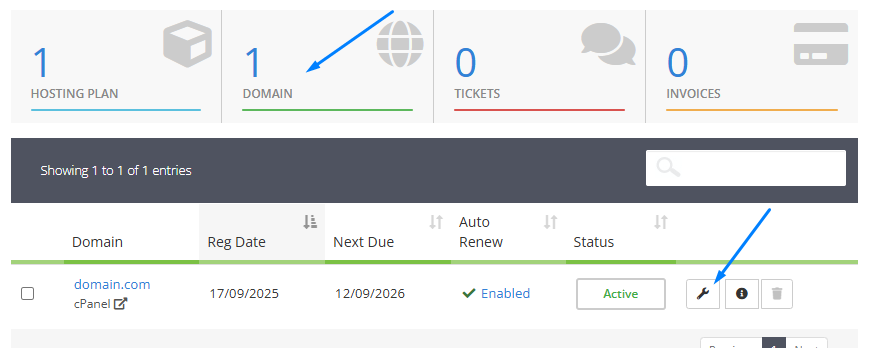
2: Click on the "Domains" box
3: Click the tool icon

4: Select "Nameservers" from the menu
5: Choose the option "Use default nameservers" and click the "Change nameservers" button
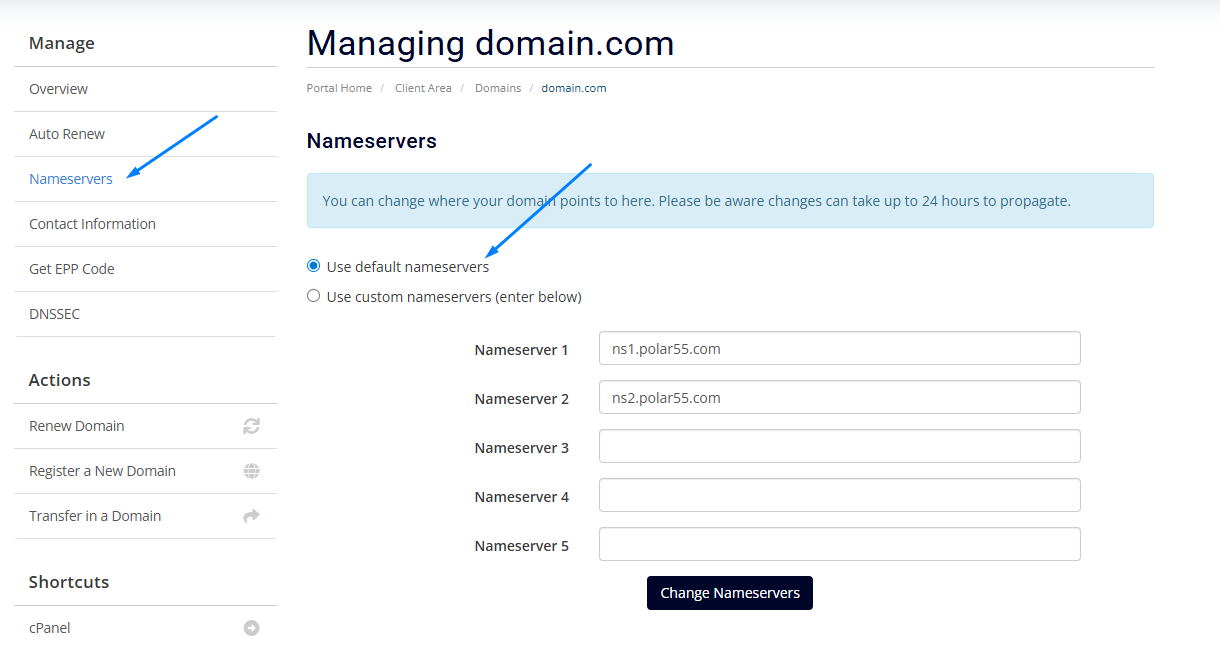
 

The nameservers should be updated within 24 hours. 

  • 23 Users Found This Useful
Was this answer helpful?

Didn't find a solution?

If you haven't found a solution by searching or navigating our categories, you can open a new support ticket.

Open New Ticket

Related Articles

Changing the primary domain

In some cases, you as a customer may wish to change your primary domain with us. However,...

How to transfer a domain to Polar55

This guide explains how to transfer a domain to Polar55. 1: Get an Auth / EPP code for the...

Spelling errors in my domain name

If you have accidentally registered a domain with a spelling you are stuck with the domain....

When will my domain be ready?

Your domain will be ready for use right away. If you have transferred your domain you need to...

How to set up DNS records (A, MX, CNAME, TXT, etc.) on your domain at Polar55

At Polar55, DNS service is included for all your domains. For the main domain, DNS record...