How to change the nameservers at Polar55

If you have transferred a domain to Polar55, the nameservers are not changed automatically. You will need to update them manually when you feel your website is ready on our server.

1: Log in to "My Account"
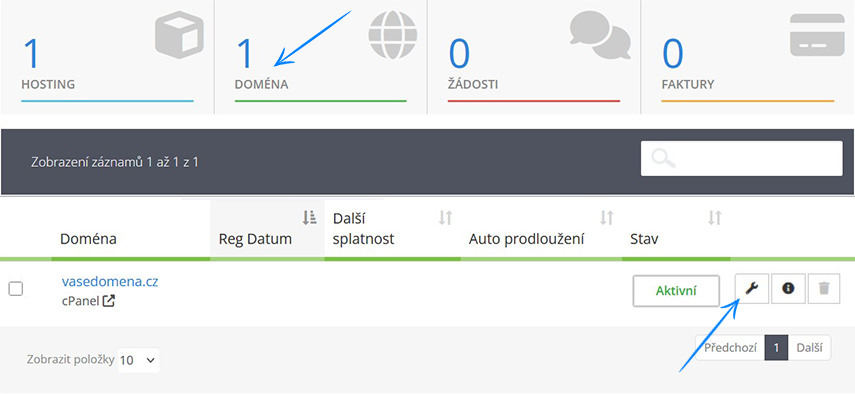
2: Click on the "Domains" box
3: Click the tool icon


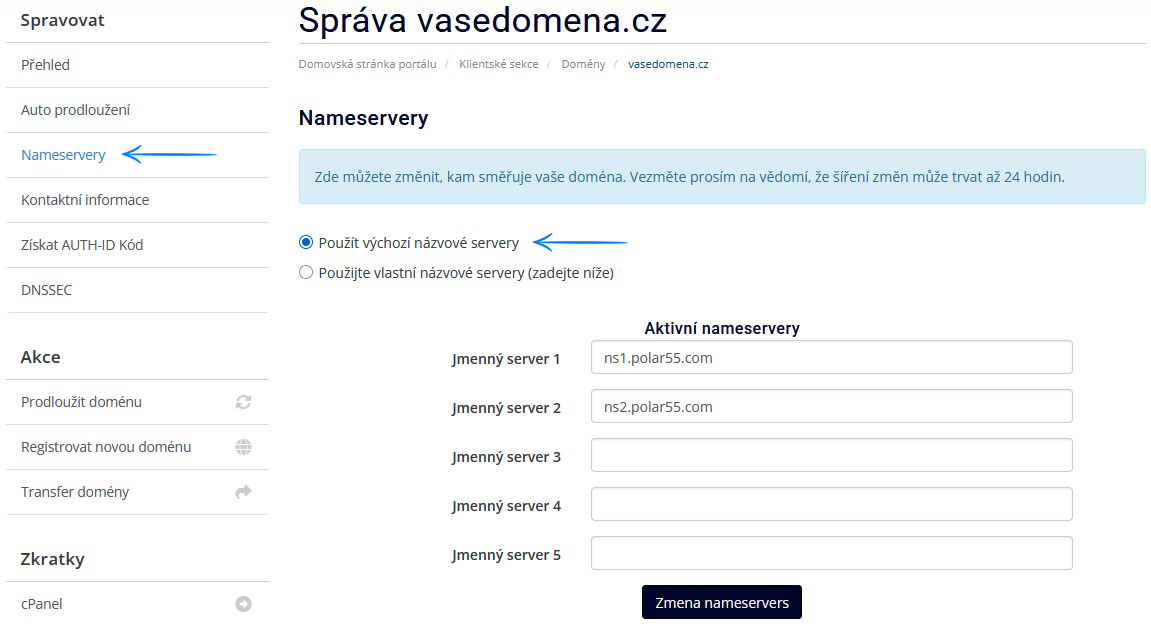
4: Select "Nameservers" from the menu
5: Choose the option "Use default nameservers" and click the "Change nameservers" button


The nameservers should be updated within 24 hours. 

  • 19 Uživatelům pomohlo
Byla tato odpověď nápomocná?

Související články

How to transfer a domain to Polar55

This guide explains how to transfer a domain to Polar55. 1: Get an Auth / EPP code for the...

Spelling errors in my domain name

If you have accidentally registered a domain with a spelling you are stuck with the domain....

Transfer Domain – How to Transfer a Domain to Your Existing Account at Polar55

If you already have an account with us, you can of course move or add more domains to it....

When will my domain be ready?

Your domain will be ready for use right away. If you have transferred your domain you need to...

Purchase web hosting without transferring/buying a domain at Polar55

When you want to create a web hosting account with Polar55, you have to decide whether you want...