

In this guide, we will show you how to export your Lovable website and host it with Polar55.
At Polar55, you can run Node.js, which is required for your Lovable site to function properly.
Lovable is a very easy tool for building simple websites, and you can quickly create a beautiful site in a short amount of time. Unfortunately, Lovable is quite expensive, so many users prefer to host their site with another provider instead of directly through Lovable.
In this guide, we will therefore show you how to quickly export your Lovable website and get it running with us.
It is important to note that this guide only works for relatively simple websites. For example, if you have a backend connected to your Lovable site or run an e-commerce store through Lovable, this guide will not work.
To follow this guide, you will need:
- A website built with Lovable
- A GitHub account (free – can be created in just a few minutes)
- A hosting account that supports Node.js – for example with Polar55
Also check out this YouTube video for a complete real-time walkthrough:
Sync your Lovable site to GitHub
Start by logging into your Lovable account and opening the project you want to export.
Then click the small GitHub icon in the top right corner.

This is where you will need a GitHub account.
Fortunately, creating a GitHub account only takes about 2 minutes, and it is completely free.
Create a GitHub account and make sure you are logged in.
Once you are logged into both GitHub and Lovable, Lovable will automatically connect to GitHub and sync your site:

Download your Lovable site from GitHub
Your site has now been synced/exported to GitHub, and you can now download it.
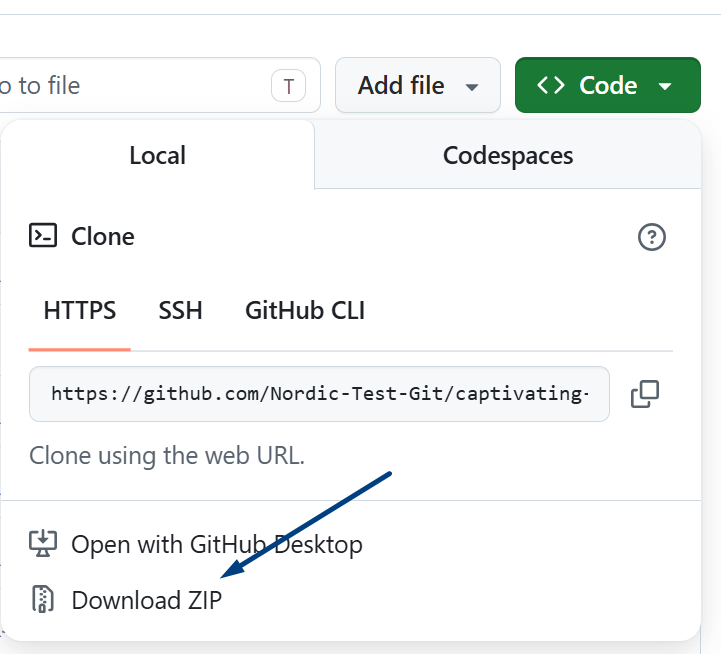
Go to the GitHub URL shown under “Clone Repository” and download your site as a ZIP file:
Upload your site to your own hosting account
You now have a ZIP file containing your Lovable site.
Log into your Polar55 account, go to cPanel, and open File Manager.
Upload your ZIP file here.
- If the site should run on your main domain, upload the ZIP file to public_html
- If the site should run on another domain, upload the ZIP file to the folder with the same name as the domain.
Once the ZIP file has been uploaded, extract it by right-clicking the file and selecting “unzip”:

You will now get a folder named after your ZIP file, for example “captivating-captures-main” (depending on the name of your GitHub repository)
-> Rename the folder to “source”Your site is now extracted and located inside the “source” folder.
Connect Lovable with Node.js
Now go back into cPanel and find Node.js.
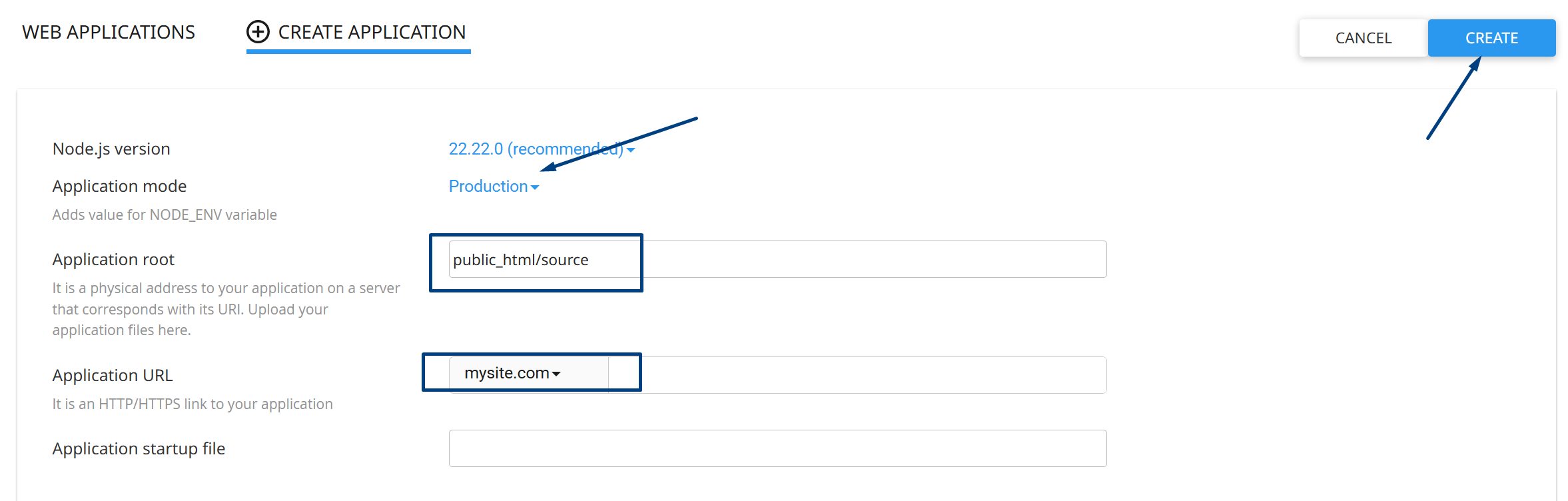
Here you need to create a new application.
Under “Application root” enter “public_html/source” – if the website should run on another domain instead of your main domain, enter “yourdomain.com/source”
Under “Application URL” specify the domain where the website should run.
Then create the application.
Activate your Lovable website
To activate your Lovable site, open the terminal in cPanel and run the following commands:
node -v
pwd
npm install --include=dev
./node_modules/.bin/vite build
This will build your Lovable website on your hosting account.
Once the process is complete, there will be a folder inside /source called dist, meaning it will be located at /source/dist/
Move the files from the dist folder so your website becomes visible
Start by opening File Manager again.
- Go into the source folder and then into the dist folder.
- Select all files – you can use the “Select all” function in File Manager
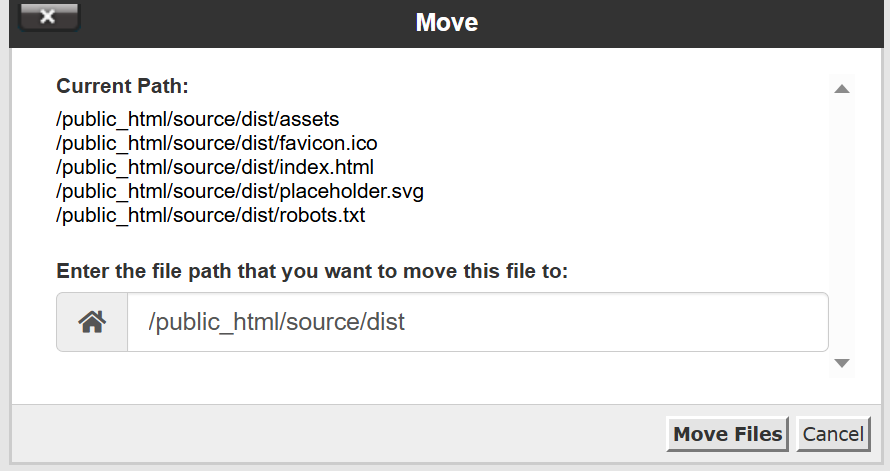
- Right-click your files and select “move”
- Change for example public_html/source/dist/ to public_html/ as shown below
Change to ->
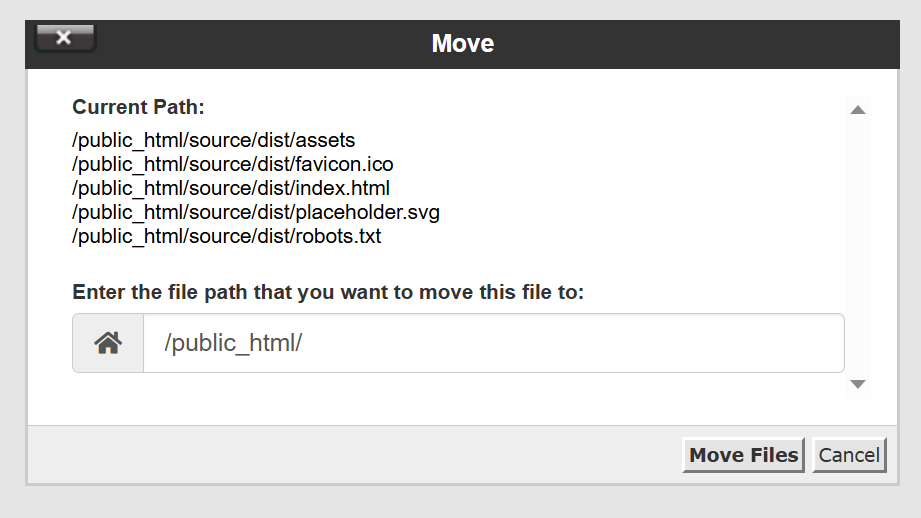
Now click “Move Files”
And that’s it! Your Lovable website should now be visible on your domain hosted with your provider.
Remember that you must update your domain’s nameservers so that it points to your hosting provider instead of Lovable. Otherwise, the site will continue to be displayed through Lovable.
You can now pause or completely cancel your Lovable subscription so that you only pay for hosting in one place.
If you want to make changes to your website in the future, you can simply log back into Lovable and reconnect it to your GitHub account. This allows you to continue working on the site, export it again, and upload it back to your own hosting account when you are done.